Senior Mobile Take-Home

Built like a production GameTime mobile feature.

This implementation turns a compact order-history prompt into a brand-aligned React Native experience with real navigation, server-state caching, runtime API validation, rotation-aware layouts, and a native share-ready calendar flow.

Demo Video

Watch the implementation walkthrough.

A 67-second narrated pass through the native purchase timeline, receipt detail, Share with Friends flow, rotation-aware layout, and review-ready engineering decisions.

MP4, H.264 video with ElevenLabs narration. Open video file
Product Intent

Why this shape wins the review.

The prompt asks for past purchases, detail receipts, mock network calls, sharing, and test coverage. The implementation goes further by showing how those requirements would become a maintainable mobile feature inside a real ticketing product.

01

Mobile first, not web disguised as mobile.

The React Native app uses safe areas, React Navigation native stack behavior, cached event artwork, native share APIs, accessible press targets, and orientation-aware layouts. The web preview exists only as a reviewer convenience.

02

Brand fluency over generic polish.

The visual system follows the current GameTime language: near-black surfaces, white type, event imagery, and mint emphasis for state and action.

03

Architecture that is easy to replace.

Mock endpoints live behind a validated service boundary, server state lives in TanStack Query, route state lives in React Navigation, and screens receive plain props.

Architecture

Layered to make tradeoffs obvious.

The repo separates prompt-aligned entities, deterministic domain logic, mock networking, presentation state, and UI primitives. That keeps feature work local while making replacement paths clear.

Source layout
App shell
QueryClientProvider with retry and stale-time defaults
SafeAreaProvider and app error boundary
Expo SDK 56 with orientation set to default
Navigation
React Navigation native stack
Typed Orders and OrderDetail routes
gametime://orders deep-link readiness
Server state
TanStack Query useOrders hook
TanStack Query useOrder hook
Cache, retry, refetch, loading, and error states
Services
Zod-validated GET /orders boundary
Zod-validated GET /orders/:orderId boundary
Native share, web share, and clipboard fallback
Domain + UI
Runtime schemas with inferred TypeScript types
Selectors, receipt formatters, and ICS generation
FlashList timeline, cached event artwork, and GameTime tokens
Data Flow

Routes, cache, validation, rendering, share.

The point of the mock layer is not to fake complexity. It is to define the same contract a real backend would satisfy later, while keeping navigation and server state in the libraries built for those jobs.

Order interaction flow
Navigate Native stack owns Orders and OrderDetail with typed route params.
Fetch TanStack Query calls the mock API and manages retry, cache, and refetch.
Validate Zod parses responses before data crosses into the domain layer.
Render Containers derive view state; screens render FlashList and receipt UI.
Share ICS content is generated and passed to native share surfaces.
Decision Ledger

Every major choice has a product reason.

The implementation uses real libraries where they remove real risk, and simple local code where a library would be ceremony. This is the architecture review in plain English.

React Navigation for screen ownership.

The detail screen is a route, not a boolean. That gives the app route params, native back behavior, iOS swipe-back, and deep-link readiness through `gametime://orders/:orderId`.

TanStack Query for server state.

Orders have loading, retry, stale-time, cache, and refetch semantics. Query owns those concerns so screens do not hand-roll flags or duplicate async logic.

Zod for the trust boundary.

Mock responses are validated like real network responses. TypeScript types are inferred from the same schemas, so runtime contracts and compile-time contracts stay aligned.

Containers keep screens honest.

Containers connect routes, queries, local search/filter state, and selectors. Screens receive plain props and stay focused on layout, accessibility, and user interaction.

FlashList anticipates real order volume.

A purchase history can grow. Virtualization keeps the timeline ready for larger data sets without changing the screen API.

expo-image for cached artwork.

Remote event images load through a shared CachedImageBackground: memory and disk caching, a blurhash placeholder, and a short fade. The heaviest content on the screen never re-downloads or flashes blank on scroll.

Dynamic type without broken layouts.

Large display text is capped with a maximum font multiplier so big accessibility text sizes never overflow fixed layouts, while body text stays free to scale.

Native screenshots prove the surface.

The README uses iPhone simulator captures for the primary proof path: order history, empty search, past filter, receipt, native share sheet, shared state, and landscape layout.
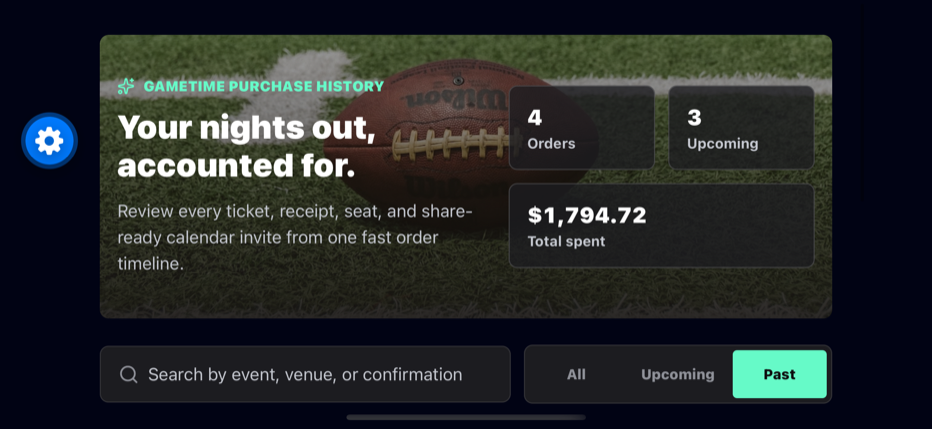
Rotation

Portrait and landscape are first-class.

The app is not locked to portrait. It uses viewport dimensions to change hero height, type scale, metric placement, and detail composition so the interface remains intentional after rotation.

Portrait Prioritizes thumb-friendly scanning, search, filters, pull-to-refresh, and image-led order cards.
Landscape Reflows the list and detail composition so the native simulator remains readable after rotation.
Tablet and web preview Uses the same React Native code path with wider grids and constrained content widths for reviewers.
Native iOS landscape screenshot of the GameTime order history app.
Quality Gates

Evidence before claims.

The implementation is backed by formatting checks, linting, strict typing, tests around the highest-risk business behavior, enforced coverage thresholds, Expo compatibility checks, and native simulator screenshots.

Tests target behavior, not snapshots.

Coverage validates calendar generation, receipt formatting, selectors, TanStack Query hooks, container retries, mock API validation, share fallbacks, and list/detail interactions.

Linting and formatting are enforced.

ESLint (expo config) and Prettier run locally and in CI. `npm run verify` chains strict typing, linting, and tests, and CI fails on any unformatted file.

Runtime schemas protect the boundaries.

Zod validates mock API responses at the trust boundary while TypeScript types are inferred from the same schemas to prevent contract drift.

Expo compatibility is verified.

Node 22, Expo SDK 56, React Native 0.85, React Navigation, TanStack Query, FlashList, expo-image, and SDK-matched packages are encoded in the repo and checked before push.

Mobile resilience is built in.

Buttons use roles and labels, status chips include text, native-stack back behavior is delegated to React Navigation, and an app error boundary prevents a blank failure state.

$ nvm use
$ npm run format
$ make verify
$ make expo-check
Repository Surface

Professional before the first file opens.

A strong GitHub page should make the quality bar visible: truthful badges, community health files, screenshots, diagrams, repeatable commands, and metadata that matches the implementation.

CI

Verification is automated.

GitHub Actions installs with Node 22, checks formatting, runs strict TypeScript, lints the source, executes Jest with coverage thresholds, and checks Expo SDK package compatibility.

5

Community health files are present.

Conduct, contribution, security, license, and CODEOWNERS files fill the public GitHub trust surface without making false claims.

GH

Repo metadata is intentional.

The docs include a repository profile with description, homepage, topics, and public surface checklist for consistency.

$ make verify
$ make expo-check
$ gh repo edit jnrahme/GameTimeTest --description "GameTime-themed React Native order history take-home"
AI Setup

How Codex was used without losing engineering control.

The AI workflow was treated like a senior engineer with tools: read the repo first, obey project rules, use specialist skills for the work at hand, verify before claiming success, and keep public documentation tied to evidence.

AGENTS.md Project rules first

The repo instructions require Node 22, Expo SDK 56 docs before RN/Expo changes, typed mock API boundaries, accessible mobile UI, and tests for order and sharing behavior.

MCP Memory check, honest fallback

SmartAssist was queried before edits and architecture decisions. Its local data directory was missing, so no hidden memory was used; the source, prompt, docs, and test output became the authority.

Skills Specialists on demand

Brainstorming shaped scope, React Native guidance shaped mobile decisions, UI/UX guidance shaped this site, Playwright checked visuals, and GitHub guidance handled publishing.

Verification Evidence before claims

The workflow runs formatting checks, lint, typecheck, Jest coverage gates, Expo package compatibility, native screenshots, CI, and Pages checks before presenting the work as review-ready.

1. Read prompt, AGENTS.md, source, and existing docs
2. Check SmartAssist MCP for project memory
3. Apply relevant Codex skills: RN, UI/UX, GitHub, Playwright, verification
4. Implement with small architecture boundaries
5. Verify locally, push, watch CI, and confirm GitHub Pages